Why Choose a Touch Switch for Your Products?
A Touch Switch can make a product feel cleaner, quieter, and easier to use. A flat glass panel has no raised button to catch dust or interrupt a smooth surface. A light tap can control a lamp, appliance, or piece of equipment. The appeal is clear. So is the responsibility: the control must respond consistently, even with damp fingers or in a dim room.
Design thinker Don Norman has written, “Good design is actually a lot harder to notice than poor design.” His point applies well to touch controls. When a Touch Switch works as expected, people may barely notice it. When it misses a tap, gives weak feedback, or activates by accident, they notice immediately. The detail matters.
This outline explores why manufacturers choose touch technology, where it can improve a product, and what to check before selecting a switch. Topics include appearance, cleaning, response, durability, installation, and user feedback. A touch surface may reduce moving parts, but that does not guarantee a longer service life. Sensors, materials, and the surrounding environment still matter. Not every product needs a Touch Switch. Sometimes a physical button is easier to find, especially when users wear gloves or cannot look at the control. That trade-off deserves a real test, not just a polished product render.
What Is a Touch Switch?
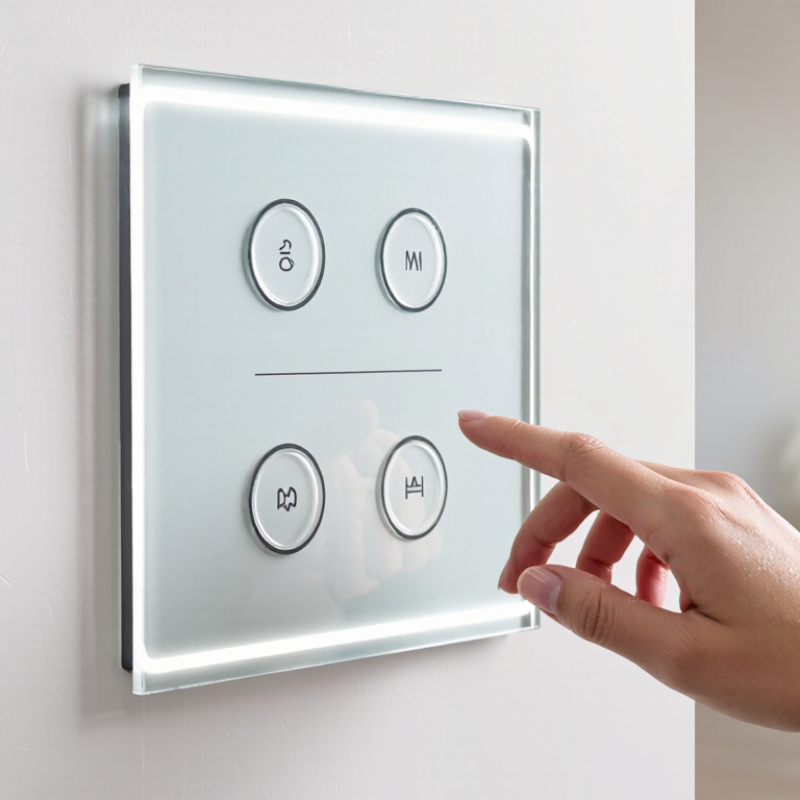
A touch switch is an electronic control that responds when a person touches a sensor surface. Unlike a mechanical switch, it may have no moving parts or visible button to press. The sensing area can sit beneath glass, plastic, or another suitable insulating panel. A light tap can turn a lamp on, adjust a setting, or activate a device.
Inside, the sensor detects a change in electrical capacitance when a finger approaches or touches the surface. A small control circuit interprets that change and sends a signal to the connected system. The response can feel immediate, though performance depends on sensor design, panel thickness, grounding, and nearby electrical noise. Wet fingers or gloves may affect detection. Small details matter.
For product designers, this means the switch can create a smooth, easy-to-clean surface and support compact layouts. It can also reduce wear caused by repeated mechanical movement. But touch control is not automatically better. A flat panel offers little physical feedback, which can make operation less certain in dim light or during movement. In real use, people may tap twice when one touch was enough. Testing the switch with the finished enclosure, not just a bare sensor, helps reveal these issues. Touch switches are best chosen when their clean appearance and simple interaction suit the product’s actual environment.
How Does a Touch Switch Work?
Why Choose a Touch Switch for Your Products? The answer begins with its sensing principle. Unlike a mechanical button, a capacitive touch switch has no moving contact. It uses a conductive electrode beneath glass, plastic, or another insulating surface. Your finger changes the local electric field. The controller measures this small capacitance shift, then compares it with a stored baseline. When the change passes a set threshold, the circuit sends a switching signal.
It happens quickly.
A microcontroller usually filters noise, checks the signal repeatedly, and prevents false activation through debounce logic. It can then drive a relay, transistor, light, or motor control circuit. This structure supports sealed panels and easier cleaning, which suits appliances, control equipment, and interior interfaces. Grand View Research reported that the global capacitive sensor market was valued at approximately USD 31.7 billion in 2023, with continued growth expected through 2030. That figure reflects wider sensor applications, not touch switches alone, but it shows strong engineering demand.
Design still requires caution. Thick gloves, moisture, poor grounding, and nearby switching noise can weaken detection. A larger electrode may improve sensitivity, yet it can also increase unwanted triggers. The practical answer is careful testing under real conditions. A laboratory prototype can behave perfectly. Production environments are less polite. International standard IEC 61000-4-2 testing also helps evaluate electrostatic-discharge resistance, though passing that test does not guarantee flawless touch performance.
Why Choose a Touch Switch? How Does It Work?
A capacitive touch switch detects changes in the electric field around its sensing electrode. A finger increases the electrode’s capacitance; the controller measures that change and triggers the switch when it crosses a threshold. The chart shows an illustrative, normalized sensor response—not measured product data.
What Benefits Can Touch Switches Bring to Product Design?
Touch switches can give a product a cleaner face. A flat glass or polymer panel removes the raised button profile, leaving more room for labels, lighting, or a continuous surface. It can also make wiping around controls easier. Small detail. In kitchens, medical equipment, and appliances, fewer gaps can mean fewer places for dust or spilled liquid to collect, though the enclosure still needs suitable sealing.
The market context is growing: Fortune Business Insights estimated the global touchscreen market at US$76.13 billion in 2023 and projected US$162.55 billion by 2032. That forecast does not measure touch switches specifically, but it signals rising familiarity with touch-based interfaces. Designers can use that familiarity to make controls feel intuitive, especially when a gentle tap produces a clear light or sound response. A useful interface should still work with damp fingers, gloves, or limited dexterity; touch is not automatically easier for everyone.
Touch controls also support flexible layouts. A single panel can change functions through software or illumination, so a product may need fewer physical openings and less tooling for different configurations. But there is a trade-off. Without tactile travel, users may not know whether a command registered. A brief confirmation light helps, yet it can be missed in bright surroundings. Test the switch on the actual product, not only a clean prototype; real users may tap too quickly, or twice.
Which Performance Factors Should Product Makers Consider?
Why Choose a Touch Switch for Your Products?
A touch switch can give a product a clean surface and a modern user experience. Yet appearance should not lead the design. Product makers should examine sensitivity, response time, durability, and operating conditions before choosing one.
A reliable switch should respond consistently through gloves, dry fingers, or light moisture. Test activation at different temperatures and with repeated touches. A response below 100 milliseconds usually feels immediate, but speed alone does not prove quality. The switch must also resist false triggers from nearby electronics, vibration, and accidental contact. Consider the feedback. A soft light or brief vibration helps users confirm activation without guessing. Power consumption matters in battery-operated products, especially when the control remains active. It is easy to overlook.
Tips: Build test samples early. Try them with real users. Record missed touches and accidental activations. Test with wet hands, but do not assume every environment needs waterproof performance.
Surface materials also affect performance. Thick glass, coated plastic, and protective films can change sensitivity. Ask for test data from controlled trials, then repeat key tests in your own product enclosure. This extra step often reveals unexpected behavior. In my experience, designers sometimes test only clean, dry fingers in a quiet room. That is not enough. A touch switch may feel excellent during a demonstration yet become unreliable after months of dust, temperature changes, and repeated use. Leave room for adjustment in the circuit and interface design.
Where Are Touch Switches Used Across Different Industries?
Touch switches appear across industries because they combine clean surfaces with quick, controlled operation. In consumer electronics, they manage power, volume, lighting, and mode selection. Their flat panels reduce openings where dust or moisture may collect. This helps designers create compact products with a modern appearance. However, a touch surface still needs clear feedback. Without a click or visible response, users may question whether their command worked.
In automotive interiors, touch switches control climate settings, cabin lighting, and media functions. Their smooth finish supports easy cleaning and flexible dashboard layouts. In home appliances, they operate ovens, washing machines, air purifiers, and induction cookers. Engineers often add sound, light, or vibration feedback for safer use. Industrial control panels also use touch switches near production equipment, where operators need fast access and simple maintenance. Protective overlays can help these panels resist frequent contact and mild chemical exposure.
Medical equipment uses touch switches when sealed surfaces support hygiene routines. Public terminals and building controls use them for elevators, access panels, and lighting systems. I have found that the best results come from matching sensitivity with the environment. Thick gloves, water droplets, and strong sunlight can affect performance. They are not perfect. A beautiful panel may still confuse users if icons are too small or feedback is delayed. Careful testing with real users remains essential, especially when a single missed input could interrupt a critical process.
| Industry | Typical Applications | Why a Touch Switch May Be Suitable | Product Design Considerations |
|---|---|---|---|
| Consumer Electronics | Control panels, audio equipment, small appliances, and device interfaces | A flat control surface can support a streamlined appearance and make controls easier to integrate into compact products. | Provide clear icons or labels, adequate spacing, and feedback such as a light or sound to confirm activation. |
| Home Appliances | Ovens, cooktops, washing machines, air purifiers, and kitchen equipment | A smooth surface can be easier to wipe than a panel with many protruding controls. | Consider operation with wet or gloved hands, resistance to heat and cleaning agents, and protection against accidental activation. |
| Automotive | Infotainment systems, climate controls, interior lighting, and console interfaces | Touch controls can be integrated into flush surfaces and offer flexible layouts for vehicle interiors. | Controls should be easy to locate and use while driving. Tactile or audible feedback and careful placement can help limit distraction. |
| Healthcare | Medical equipment interfaces, examination-room controls, and monitoring devices | Sealed touch surfaces can have fewer gaps where dust and residue may collect, depending on the design. | Specify suitable materials and cleaning compatibility. Follow applicable safety, usability, and regulatory requirements for the device. |
| Commercial Buildings | Lighting controls, access panels, room controls, and building-management interfaces | A consistent, low-profile interface can fit modern wall panels and shared spaces. | Use legible markings and reliable feedback; select a design appropriate for the expected traffic and cleaning routine. |
| Hospitality | Guest-room lighting, bedside controls, climate settings, and service panels | Touch controls can combine several functions in a compact panel and support a clean interior design. | Make functions intuitive for first-time users, and provide clear indicators for active settings. |
| Industrial Equipment | Machine operator panels, process controls, and equipment interfaces | Touch switches can be incorporated into sealed panels where a suitable enclosure and sensor design are used. | Assess dust, moisture, vibration, electromagnetic interference, and glove use. Choose controls appropriate to the operating environment. |
| Public and Retail Spaces | Information kiosks, ticketing terminals, self-service equipment, and display controls | A flat interface can be convenient to clean and can support frequently used public-facing functions. | Design for repeated use, accessible placement, clear instructions, and appropriate protection against impact and vandalism. |
Article Source:
Get a quote
Get a quote
Read More
Accept AllReject AllCustomise
Privacy Overview
| Cookie | Duration | Description |
|---|---|---|
| cookielawinfo-checkbox-advertisement | 1 year | Set by the GDPR Cookie Consent plugin, this cookie records the user consent for the cookies in the "Advertisement" category. |
| cookielawinfo-checkbox-analytics | 11 months | This cookie is set by GDPR Cookie Consent plugin. The cookie is used to store the user consent for the cookies in the category "Analytics". |
| cookielawinfo-checkbox-functional | 11 months | The cookie is set by GDPR cookie consent to record the user consent for the cookies in the category "Functional". |
| cookielawinfo-checkbox-necessary | 11 months | This cookie is set by GDPR Cookie Consent plugin. The cookies is used to store the user consent for the cookies in the category "Necessary". |
| cookielawinfo-checkbox-others | 11 months | This cookie is set by GDPR Cookie Consent plugin. The cookie is used to store the user consent for the cookies in the category "Other. |
| cookielawinfo-checkbox-performance | 11 months | This cookie is set by GDPR Cookie Consent plugin. The cookie is used to store the user consent for the cookies in the category "Performance". |
| CookieLawInfoConsent | 1 year | CookieYes sets this cookie to record the default button state of the corresponding category and the status of CCPA. It works only in coordination with the primary cookie. |
| viewed_cookie_policy | 11 months | The cookie is set by the GDPR Cookie Consent plugin and is used to store whether or not user has consented to the use of cookies. It does not store any personal data. |
| Cookie | Duration | Description |
|---|---|---|
| _cs_c | 1 year 1 month | The cookie is used by Content Square to save the user consent to be tracked. |
| Cookie | Duration | Description |
|---|---|---|
| _cs_id | 1 year 17 days 20 hours 13 minutes | This cookie is used to store the ContentSquare's user identifier ID. This is a persistent cookie and expires after 13 months. |
| _cs_s | 1 hour | This cookie is used to store the number of page's viewed by a visitor within the session for ContentSquare's solution. |
| _ga | 1 year 1 month 4 days | Google Analytics sets this cookie to calculate visitor, session and campaign data and track site usage for the site's analytics report. The cookie stores information anonymously and assigns a randomly generated number to recognise unique visitors. |
| _ga_* | 1 year 1 month 4 days | Google Analytics sets this cookie to store and count page views. |
| _gcl_au | 3 months | Google Tag Manager sets the cookie to experiment advertisement efficiency of websites using their services. |
| Cookie | Duration | Description |
|---|---|---|
| test_cookie | 15 minutes | doubleclick.net sets this cookie to determine if the user's browser supports cookies. |
| Cookie | Duration | Description |
|---|---|---|
| _cs_root-domain | session | Description is currently not available. |
| _cs_same_site | session | Description is currently not available. |